Why your phone number is a master key
Your phone number was never designed to be a security credential, but it functions like one anyway. Banks, email providers, and social platforms routinely send one-time codes by text message to confirm it’s really you, and many let you reset a forgotten password with nothing but access to that number. The FCC’s guide to SIM swap and port-out fraud puts it plainly: “your mobile phone number may be the key to your most important financial accounts,” since “text messages are often used by banks, businesses and payment services to verify your identity when you request updates to your account.” Whoever holds your number, even briefly, can walk through that door.
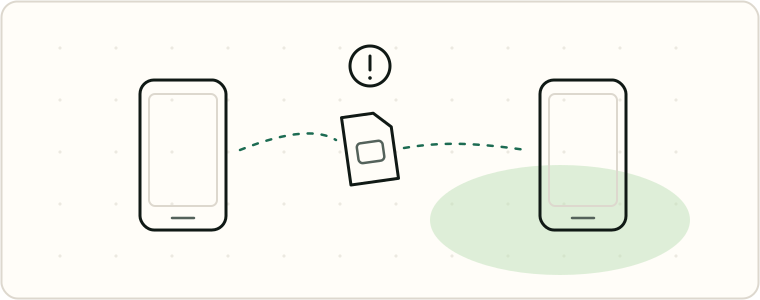
How takeovers actually happen
There are two distinct scams the FCC treats as related but separate.
- SIM swapping. Someone convinces your carrier to move your phone service onto a SIM card they control, or physically steals your SIM. The FCC explains that with enough of your personal information, a scammer can “con a victim’s mobile phone company into believing the request is from the authorized account holder,” and once moved, “the scammer can gain control over the victim’s private texts and calls” and use that to reset credentials on financial and social accounts.
- Port-out fraud. Instead of swapping your SIM at your own carrier, the attacker opens an account at a different carrier while posing as you, then arranges to have your number ported to that new account. The FCC’s enforcement advisory on SIM fraud describes this as the attacker “posing as the victim” to open service elsewhere and then transferring the number into an account they control.
Both routes let an attacker intercept your calls and SMS codes without touching your physical phone. The same FCC advisory also notes threat actors using tactics like emergency-disclosure requests to pull information from carriers, and cites a Department of Homeland Security review finding bad actors compromising telecom infrastructure directly to intercept authentication codes.
Insider fraud is documented, not hypothetical. In one federal case, a manager at a wireless carrier’s Orlando office used his employee access to “bypass the provider’s security protocols,” letting a group swap victims’ SIM cards without calling in as the victim — the Department of Justice reported the scheme stole more than $509,475 in cryptocurrency before four men were sentenced to prison.
eSIM technology, now standard on newer phones, closes off the physical-theft version of this attack — eSIMs are “hardwired inside the phone” and can’t be pulled out and moved to another device — but it does nothing to stop a social-engineered swap or a port-out, which happen on the carrier’s side. “Port-out scams remain a security concern” even with an eSIM, the FCC notes.
What the FCC’s rules require — and their actual status
In November 2023 the FCC adopted new rules requiring carriers to authenticate customers before SIM changes and port-outs, notify customers immediately, offer a free account lock, train staff, and help remediate fraud — the FCC’s Report and Order sets out the framework, summarized in the FCC’s enforcement advisory. Carriers must:
- Verify you before moving your number, using “secure methods of authenticating a customer before redirecting a customer’s phone number to a new device or provider,” and “regularly, but not less than annually, review and, as necessary, update” those methods.
- Train staff and wall off customer data — “institute employee training for handling SIM swap and port-out fraud” and block customer-service employees from your account data “until after the customer has been authenticated.”
- Notify you immediately of SIM change and port-out requests and failed authentication attempts.
- Offer a free account lock to “block processing of SIM changes and number ports,” required to be “at no cost.”
- Help you if it happens — maintain a clear reporting process, “promptly investigate and remediate fraud,” and “promptly provide customers with documentation of fraud.”
The FCC writes that these protections “can act as a shield for domestic violence survivors by preventing bad actors, such as abusers, from taking control of a survivor’s phone or phone number.”
Here’s the honest version of where things stand: these rules are adopted, but the compliance date has been unsettled for two years — don’t assume every carrier is already legally required to comply. The rules originally carried a July 8, 2024 compliance date, but the FCC’s Wireline Competition Bureau waived that deadline, “result[ing] in a single synchronized timeframe”: the whole package becomes mandatory once the Office of Management and Budget finishes its Paperwork Reduction Act review and the FCC publishes a Federal Register notice announcing the compliance date. The Federal Register’s regulatory tracker for this rulemaking still lists “Next Action Undetermined,” with no compliance-date notice on record. Carriers may implement pieces voluntarily, but as of July 2026 no confirmed date has made the package mandatory — turn on a carrier’s lock feature regardless, not because the mandate is confirmed in force.
Turning on your carrier’s lock feature
Even without a confirmed compliance date, several major carriers already offer free lock features you can turn on today. Two documented examples:
- T-Mobile offers Port Out Protection free to Postpaid, Business, Prepaid, and Metro by T-Mobile customers — T-Mobile’s support page says it “adds additional security to your account by blocking unauthorized users from transferring your lines to another wireless carrier.” Add it per line via T-Life (Manage → gear icon → Security) or T-Mobile.com. Any Authorized User can add it, but only the Primary Account Holder can remove it. T-Mobile’s separate SIM Protection feature, which “prevents bad actors from moving your number to another device,” is Postpaid only — prepaid and Metro customers don’t get that toggle.
- Verizon offers Number Lock, available “at no cost,” to “lock lines on your account to prohibit the port out of your number.” Once enabled, “a Locked line cannot process a Port Out until Number Lock is disabled,” with a text confirming activation. Only Account Owners or Account Managers can toggle it.
If your carrier isn’t listed here, search its support site for “port lock,” “number lock,” “SIM protection,” or “port freeze” to see what it already offers.
The intimate-adversary problem: family plans
None of the protections above fully help if the threat is the person who legally administers your line. On a shared family plan, the primary account holder can typically see billing details, manage lines, and request account changes. Both carriers build this in: only T-Mobile’s Primary Account Holder can remove Port Out Protection once added, and only Verizon’s Account Owners or Account Managers can toggle Number Lock. If the person you’re worried about holds that role, a lock they also control isn’t a real barrier — though an authorized user can still add protection to their own line without the administrator’s help.
If you’re on a shared plan with someone unsafe, the practical fix is getting your own line, not just adding settings to a shared one. See A new phone, a clean start for how the Safe Connections Act lets survivors of domestic abuse and related crimes separate their line from a shared plan. Pair that with a full account-security pass — new passwords, non-SMS two-factor authentication, and a recovery-access review — covered in Securing your accounts when someone knows you.
Signs it’s happening to you
The clearest sign is sudden, complete loss of cell service: no bars, no calls, no texts, when your phone should otherwise be working normally. That’s different from a dead zone or an outage — a swap or port-out kills your line entirely, because it no longer belongs to your SIM. Other signs: unexpected “your SIM has changed” or “your number has been ported” notifications you didn’t request, login alerts or password-reset emails you didn’t trigger, or accounts suddenly showing you logged out everywhere.
What to do if you lose service unexpectedly
- Get to Wi-Fi and contact your carrier immediately, using a different phone or browser-based chat if you have to, and ask them to investigate and lock the account against further changes.
- Change your carrier account password and PIN once you regain access, from a device you know is secure.
- Check financial and email accounts for unauthorized resets or logins, and follow that provider’s own account-recovery process directly.
- File a report. The FCC recommends contacting local law enforcement and filing a police report, filing an identity theft report with the FTC, and placing a fraud alert with one of the three major credit bureaus, which will share it with the other two.
- Ask your carrier for documentation of the fraud — it can help if you need to dispute fraudulent charges or accounts opened in your name.
If the loss of service coincides with other signs of monitoring or control by someone you know, treat this as part of a larger pattern, and read Safety first: before you remove anything before changing settings that person might notice.
No lock or setting makes a phone number un-stealable — authentication still depends on a human at a call center getting it right every time. But between the carrier account locks available today, the FCC’s rules once they take full effect, and getting off a shared plan with the wrong person, you can close off most of the paths that don’t require anyone to touch your physical device at all.